Sodimac.Internal
Platform

Sodimac.Internal
Platform

Sodimac.
Internal Platform

Time: 8 months project | Role: UX UI Designer | Team: 1 designer

Sodimac is a leading retail company specializing in construction, hardware, and home improvement products across Latin America. During my time at Globant, I collaborated with Sodimac Colombia to enhance the user experience of their internal B2B2C platform, a key system connecting employees, distributors, and delivery partners. As the UX/UI Designer, I worked across multiple teams, including Infinity, Cedis, and Dashboards, to transform the product’s usability and consistency. When I joined, development was entirely tech-driven, lacking a user-centered approach. I introduced UX research, design validation, and cross-team alignment, setting the foundation for a scalable and user-focused design system.

Understanding the challenge

To begin this large-scale project, I first needed to understand the platform’s purpose, its users, and Sodimac’s goals. The main objective was to streamline the process of selecting, reserving, purchasing, tracking, and visualizing merchandise across all Sodimac stores and partner networks in Colombia.

Through stakeholder interviews and system reviews, I identified three primary user groups: internal employees, associated distributors, and delivery companies. The platform’s core goal was to enable these groups to collaborate seamlessly, improving visibility, reducing delays, and optimizing operations through a unified digital experience.

To begin this large-scale project, I first needed to understand the platform’s purpose, its users, and Sodimac’s goals. The main objective was to streamline the process of selecting, reserving, purchasing, tracking, and visualizing merchandise across all Sodimac stores and partner networks in Colombia.

Through stakeholder interviews and system reviews, I identified three primary user groups: internal employees, associated distributors, and delivery companies. The platform’s core goal was to enable these groups to collaborate seamlessly, improving visibility, reducing delays, and optimizing operations through a unified digital experience.

  1. The platform’s goal was to simplify and connect key retail operations, from product selection and reservation to purchase tracking and inventory visibility across Sodimac’s Colombian stores and partner network. Some merchandise was also managed by third-party providers, requiring seamless coordination.

  2. I identified three main user groups: internal employees, distributors, and delivery partners.

  3. The platform aimed to enable collaboration between these roles, giving each visibility and control to manage products efficiently, reduce delays, and eliminate redundant steps in the supply chain.

  1. The platform’s goal was to simplify and connect key retail operations, from product selection and reservation to purchase tracking and inventory visibility across Sodimac’s Colombian stores and partner network. Some merchandise was also managed by third-party providers, requiring seamless coordination.

  2. I identified three main user groups: internal employees, distributors, and delivery partners.

  3. The platform aimed to enable collaboration between these roles, giving each visibility and control to manage products efficiently, reduce delays, and eliminate redundant steps in the supply chain.

Planning & Prioritization

At the start of this ambitious project, our team was facing a complex platform with multiple user types and overlapping processes. I joined a group of backend developers, marketing specialists, and operations teams, and together we needed to figure out where to start and what would deliver the most value to users.

We kicked off with collaborative planning sessions, mapping out user flows and identifying the most critical features. Early on, I noticed the team was duplicating efforts on features that might never reach the users, so I introduced a feature prioritization matrix.

By recommending to pause certain developments until user testing validated our assumptions, we shifted the team from a purely tech-driven workflow to a user-centered approach, laying the foundation for all future design decisions.

At the start of this ambitious project, our team was facing a complex platform with multiple user types and overlapping processes. I joined a group of backend developers, marketing specialists, and operations teams, and together we needed to figure out where to start and what would deliver the most value to users.

We kicked off with collaborative planning sessions, mapping out user flows and identifying the most critical features. Early on, I noticed the team was duplicating efforts on features that might never reach the users, so I introduced a feature prioritization matrix.

By recommending to pause certain developments until user testing validated our assumptions, we shifted the team from a purely tech-driven workflow to a user-centered approach, laying the foundation for all future design decisions.

Focusing on Key Workflows

The platform included a wide range of tasks and features, making it impossible to cover everything in a single case study. To provide a clear and meaningful example, I chose to focus on one critical user flow within the Dashboards.

This flow allowed users to track inventory, view product distribution, and generate reports efficiently, representing the most common and impactful interactions on the platform. By narrowing the scope, we could showcase the design process, decisions, and outcomes in a way that is both digestible and insightful for readers.

The platform included a wide range of tasks and features, making it impossible to cover everything in a single case study. To provide a clear and meaningful example, I chose to focus on one critical user flow within the Dashboards.

This flow allowed users to track inventory, view product distribution, and generate reports efficiently, representing the most common and impactful interactions on the platform. By narrowing the scope, we could showcase the design process, decisions, and outcomes in a way that is both digestible and insightful for readers.

Mapping the User Flow (with User Insights)

After narrowing our focus, I mapped the key user flow for the Dashboard feature, detailing every step from inventory validation to report generation. This allowed me to identify pain points, bottlenecks, and opportunities for simplification before diving into design.

Key User Insights:

  • “I often spend too much time searching for product details across different screens.” – Distributor

  • “It’s confusing to know which tasks are most urgent when there’s so much information on the dashboard.” – Internal employee

  • “I wish I could see stock levels for multiple locations without navigating through multiple menus.” – Delivery partner

These insights directly informed the low-fidelity wireframes and later high-fidelity prototypes, helping ensure that the final design addressed real user pain points and improved efficiency.

Image shows: User flow

With the flow defined, I created low-fidelity wireframes to explore layout options and interaction patterns. These wireframes were tested with users, gathering feedback to iterate quickly and ensure the design matched real user needs.

Once validated, I developed high-fidelity prototypes to communicate the final design to developers. This iterative process ensured that each step of the flow was intuitive, efficient, and aligned with the platform’s objectives, setting the stage for a consistent and scalable UI.

With the flow defined, I created low-fidelity wireframes to explore layout options and interaction patterns. These wireframes were tested with users, gathering feedback to iterate quickly and ensure the design matched real user needs.

Once validated, I developed high-fidelity prototypes to communicate the final design to developers. This iterative process ensured that each step of the flow was intuitive, efficient, and aligned with the platform’s objectives, setting the stage for a consistent and scalable UI.

Low -fidelity wireframe - home CEDIS

Low -fidelity wireframe - product information

Building the UI Kit & Design System

While developing the high-fidelity screens, I realized that the platform lacked a cohesive design system. Each team was working with different guidelines, leading to inconsistencies across dashboards and modules.

I took the lead in creating a scalable UI Kit, including color palette, typography, iconography, components, grids, buttons, menus, and cards. This system not only ensured visual consistency, but also accelerated development by providing developers with reusable components and clear guidelines.

The Design System became the foundation for all future platform features and applications, allowing the team to maintain a unified brand identity while scaling new functionalities efficiently.

While developing the high-fidelity screens, I realized that the platform lacked a cohesive design system. Each team was working with different guidelines, leading to inconsistencies across dashboards and modules.

I took the lead in creating a scalable UI Kit, including color palette, typography, iconography, components, grids, buttons, menus, and cards. This system not only ensured visual consistency, but also accelerated development by providing developers with reusable components and clear guidelines.

The Design System became the foundation for all future platform features and applications, allowing the team to maintain a unified brand identity while scaling new functionalities efficiently.

Image shows: Typography

Image shows: Color palette designed

Bringing the High-Fidelity Design to Life

With the foundation set through UX research, user flow mapping, and low-fidelity wireframes, I moved on to high-fidelity prototypes. This stage was where the design truly came to life. I developed a cohesive UI Kit including color palette, typography, iconography, grid systems, components, gradients, shadows, buttons, menus, and cards, ensuring a consistent and scalable user interface.

Every design decision was intentional, aimed not only at visual appeal but also at enhancing usability, accessibility, and consistency across the platform. The prototypes reflected real user workflows, allowing employees, distributors, and delivery partners to navigate intuitively, track products, and manage inventories efficiently.

With the foundation set through UX research, user flow mapping, and low-fidelity wireframes, I moved on to high-fidelity prototypes. This stage was where the design truly came to life. I developed a cohesive UI Kit including color palette, typography, iconography, grid systems, components, gradients, shadows, buttons, menus, and cards, ensuring a consistent and scalable user interface.

Every design decision was intentional, aimed not only at visual appeal but also at enhancing usability, accessibility, and consistency across the platform. The prototypes reflected real user workflows, allowing employees, distributors, and delivery partners to navigate intuitively, track products, and manage inventories efficiently.

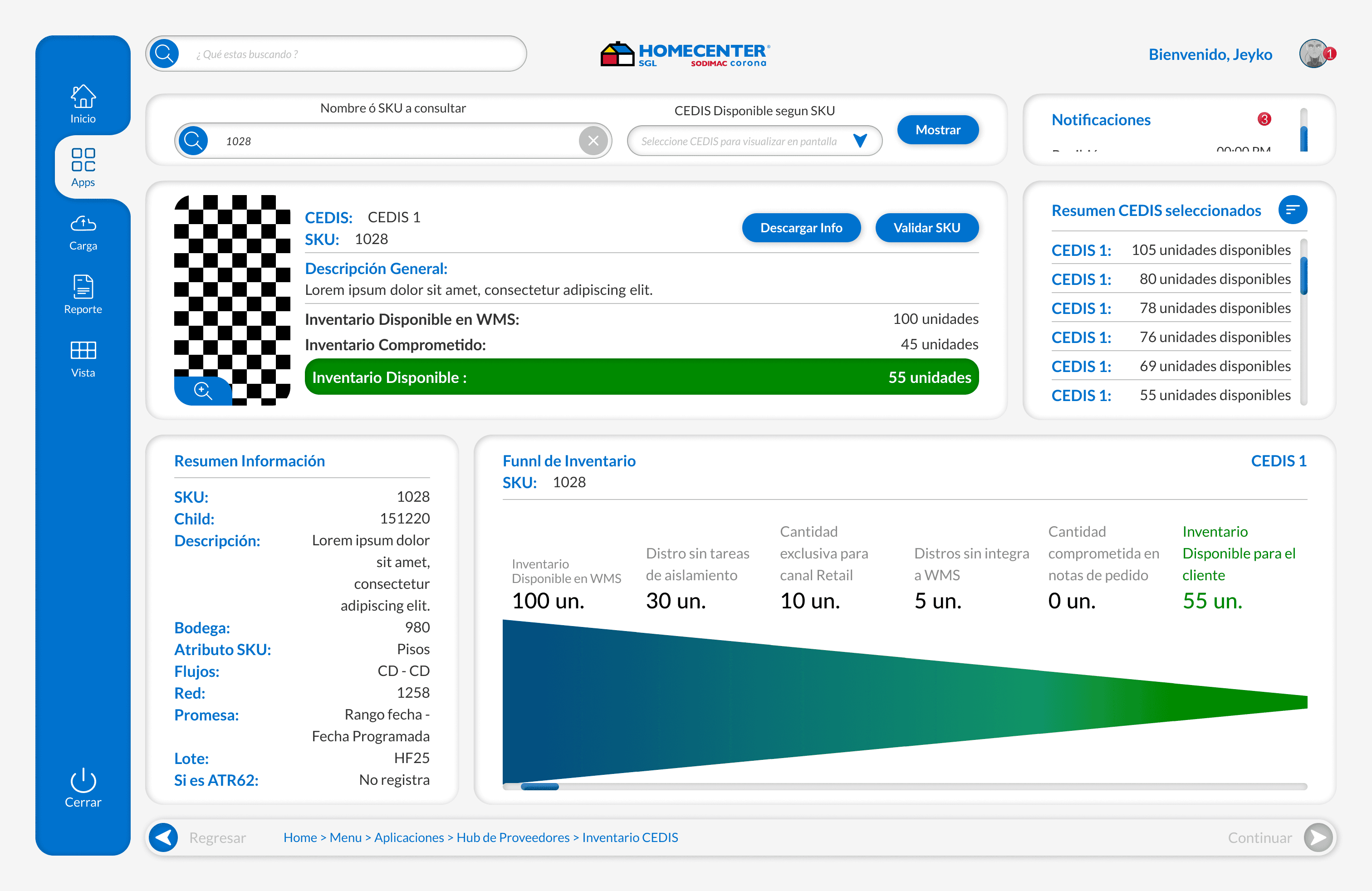
Screen with products and their details

Screen showing 1 product and its distribution

The Prototype: Bringing Workflows to Life

Once the high-fidelity screens were ready, I created interactive prototypes to simulate real user interactions. This allowed stakeholders and end users to experience the platform before development, validating usability, navigation, and task flows.

The prototype demonstrated critical features of the Dashboard:

  • Home Page & Workflow Updates: Users could track tasks, view product inventory, and monitor order statuses in real-time.

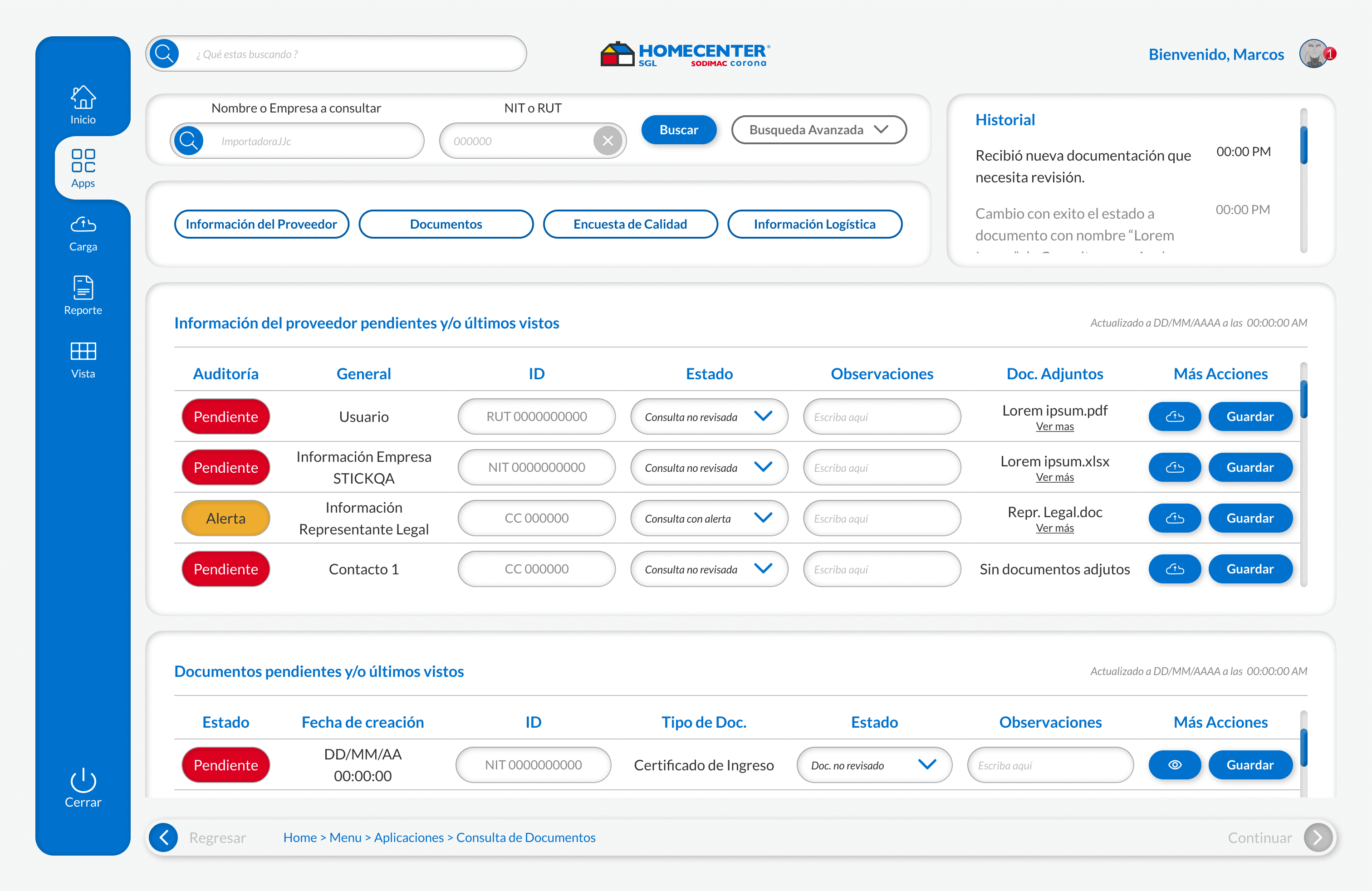
  • Document Lookup: Quick access to product documents, inventory reports, and distribution details, streamlining information retrieval.

  • Product Detail Screens: Enabled employees and distributors to make data-driven decisions efficiently, improving operational efficiency.

These prototypes were crucial for user testing, stakeholder feedback, and iterative improvements, ensuring the final product aligned with business objectives and user needs.

Video of the prototype

More Features: Enhancing the Platform Experience

Beyond the core dashboards, additional features were designed to improve the overall user experience:

  • Inventory Visualization: Clear display of stock levels across multiple locations, enabling better supply chain management.

  • Product Distribution Overview: Intuitive data presentation to help users track product flow and optimize logistics.

  • Interactive Dashboards: Modular UI components that adapt to different user roles—employees, distributors, and delivery partners.

These features were built using a scalable design system, ensuring visual consistency, component reusability, and efficient development across teams. By combining UX research, high-fidelity design, and interactive prototyping, the platform transformed into a user-centered tool that improved collaboration, visibility, and operational performance.

Dashboard screen - Hi -Fi

Workflow updates - Hi -Fi

Document lookup screens

Skills & Experience gained

During my time at Sodimac Colombia, I developed a wide range of UX/UI skills and cross-functional collaboration abilities:

  • UX Research & User Testing: Conducted interviews, workflow analysis, and usability tests

  • Design Systems & UI Kits: Created a scalable design system with components, typography, and grids

  • High-Fidelity Prototyping: Developed interactive prototypes simulating real user workflows

  • Agile Methodologies & Task Management: Collaborated with developers, operations teams, and stakeholders

  • UX Writing & Information Architecture: Optimized content clarity and information hierarchy

This project strengthened my ability to deliver user-centered design solutions, collaborate with cross-functional teams, and create scalable, consistent, and visually compelling interfaces that drive measurable impact.

During my time at Sodimac Colombia, I developed a wide range of UX/UI skills and cross-functional collaboration abilities:

  • UX Research & User Testing: Conducted interviews, workflow analysis, and usability tests

  • Design Systems & UI Kits: Created a scalable design system with components, typography, and grids

  • High-Fidelity Prototyping: Developed interactive prototypes simulating real user workflows

  • Agile Methodologies & Task Management: Collaborated with developers, operations teams, and stakeholders

  • UX Writing & Information Architecture: Optimized content clarity and information hierarchy

This project strengthened my ability to deliver user-centered design solutions, collaborate with cross-functional teams, and create scalable, consistent, and visually compelling interfaces that drive measurable impact.

Create a free website with Framer, the website builder loved by startups, designers and agencies.